Write a module
When the built-in modules don't draw what you want, a module is one Python
class in your project's modules/ directory. This page writes a
timeline: hour marks down a vertical rule, with writing space beside
them.
The shape of a module
modules/stamp.py, which journalkit init wrote, is the whole pattern:
from journalkit.modules import Module, register

@register("stamp")
class Stamp(Module):
    """A dashed frame to stick a photo or a ticket in."""

    params = {"label": "text drawn in the corner"}

    def natural_height(self, width):
        return 40.0

    def draw(self, canvas, rect):
        canvas.rect(rect.x, rect.y, rect.w, rect.h, fill="none",
                    stroke=self.stroke, stroke_width=self.stroke_width,
                    stroke_dasharray=self.opt("dash", "1 1"))
        self.draw_label(canvas, rect)
        self.draw_dots(canvas, rect)
@register("stamp")makestype: stampavailable in YAML. Every.pyinmodules/is imported before a build.paramsis documentation forjournalkit modules.natural_heightis the height used when the template gives none. ReturnNonefor "no opinion", which behaves likefill.drawgets aCanvasand aRect, already snapped to the grid, in page millimetres.
The timeline
Create modules/timeline.py:
"""A day plan: hour labels down a vertical rule, writing space to the right."""

from journalkit.modules import Module, register


@register("timeline")
class Timeline(Module):
    """Hour marks down the left edge with a writing area beside them."""

    params = {
        "start": "first hour (default 8)",
        "end": "last hour (default 20)",
        "gutter": "width of the hour-label gutter in mm (default 10)",
        "dots": "true to fill the writing area with the dot lattice",
    }

    def _hours(self):
        return range(int(self.opt("start", 8)), int(self.opt("end", 20)) + 1)

    def natural_height(self, width):
        # One grid step per hour keeps every mark on the lattice.
        return len(self._hours()) * self.ctx.grid * 2

    def draw(self, canvas, rect):
        gutter = self.length("gutter") or 10.0
        hours = list(self._hours())
        step = rect.h / len(hours)
        axis_x = rect.x + gutter

        canvas.line(axis_x, rect.y, axis_x, rect.bottom,
                    stroke=self.stroke, stroke_width=self.stroke_width)
        for index, hour in enumerate(hours):
            y = rect.y + index * step
            canvas.line(axis_x - 1.0, y, axis_x + 1.0, y,
                        stroke=self.stroke, stroke_width=self.stroke_width)
            # Baseline placed from the cap height, so the label centres on the tick.
            self.text(canvas, axis_x - 2.0, y + self.cap_height("label") / 2,
                      "%02d" % hour, style="label", text_anchor="end")

        if self.opt("dots"):
            from journalkit.geometry import Rect
            self.draw_dots(canvas, Rect(axis_x, rect.y, rect.right - axis_x, rect.h))
What it uses:
self.opt(key, default)reads a YAML option;self.length(key)does the same and converts units to millimetres.self.strokeandself.stroke_widthcome from the theme unless the YAML overrides them.self.text(...)draws in the theme'slabelstyle. Placing the baseline aty + cap_height / 2centres a capital ony.self.draw_dots(rect)samples the page's dot lattice inside whatever rect you give it, so the dots line up with every other dotted module.self.ctx.gridis the module grid. Nothing forces your internal geometry onto it; the grid rule is about where the module is placed.
Try it
timeline — Hour marks down the left edge with a writing area beside them.  [timeline.py]
      start          first hour (default 8)
      end            last hour (default 20)
      …
preview renders a snippet without a template file:
echo '- {type: heading, text: TODAY}
- {type: timeline, start: 7, end: 19, dots: true}' | journalkit preview
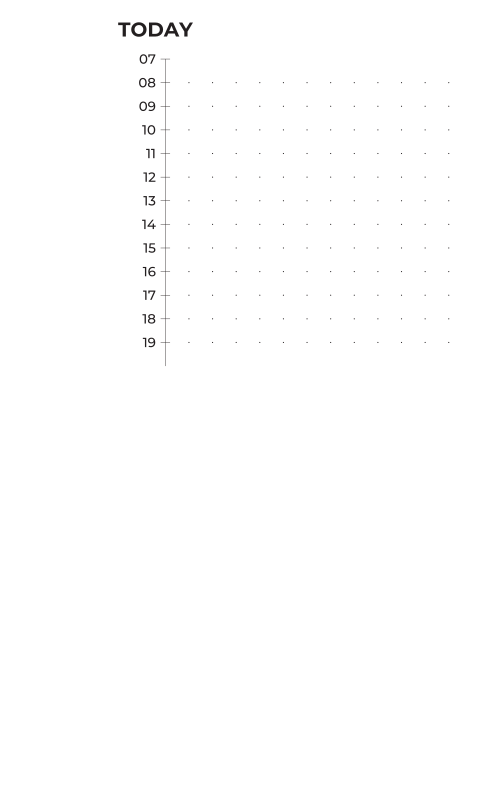
Then use it in a template like any other module. With height: fill the
hour spacing stretches to fit; without it, natural_height decides.
The custom modules guide lists the rest of the
Module API.